Chapter 11 recording formats and device settings

I honestly, was not a fan of this chapter. I found it very dull and boring. I may have read like one page with one eye open. A video tape is  motion of pictures all together. Videotape is divided into four tracks. The video track is the widest region and is used to store the pictures of portion of a television program. Over the years this has changed and improved.

Related image

Digital audio encoding is important. analog audio technologies like the phonograph and cassette tape recorder were designed to capture or reproduce the natural fluctuations of original sound waves from beginning to end without any interruption. An example when listening to a phonograph record, the stylus or needle remains to continuous contact with the vinyl disc as it spins on the turntable.

Sample rate is designated in kilohertz units. Since human hearing has a frequency range of 20Hz, a minimum sample rate of 40kHz is required in order to effectively capture and encode all the frequencies within this range. Bit depth affects its dynamic range and amount of noise and distortion introduced during the recording process. Each audio sample is stored as a binary sequence of zero and ones.
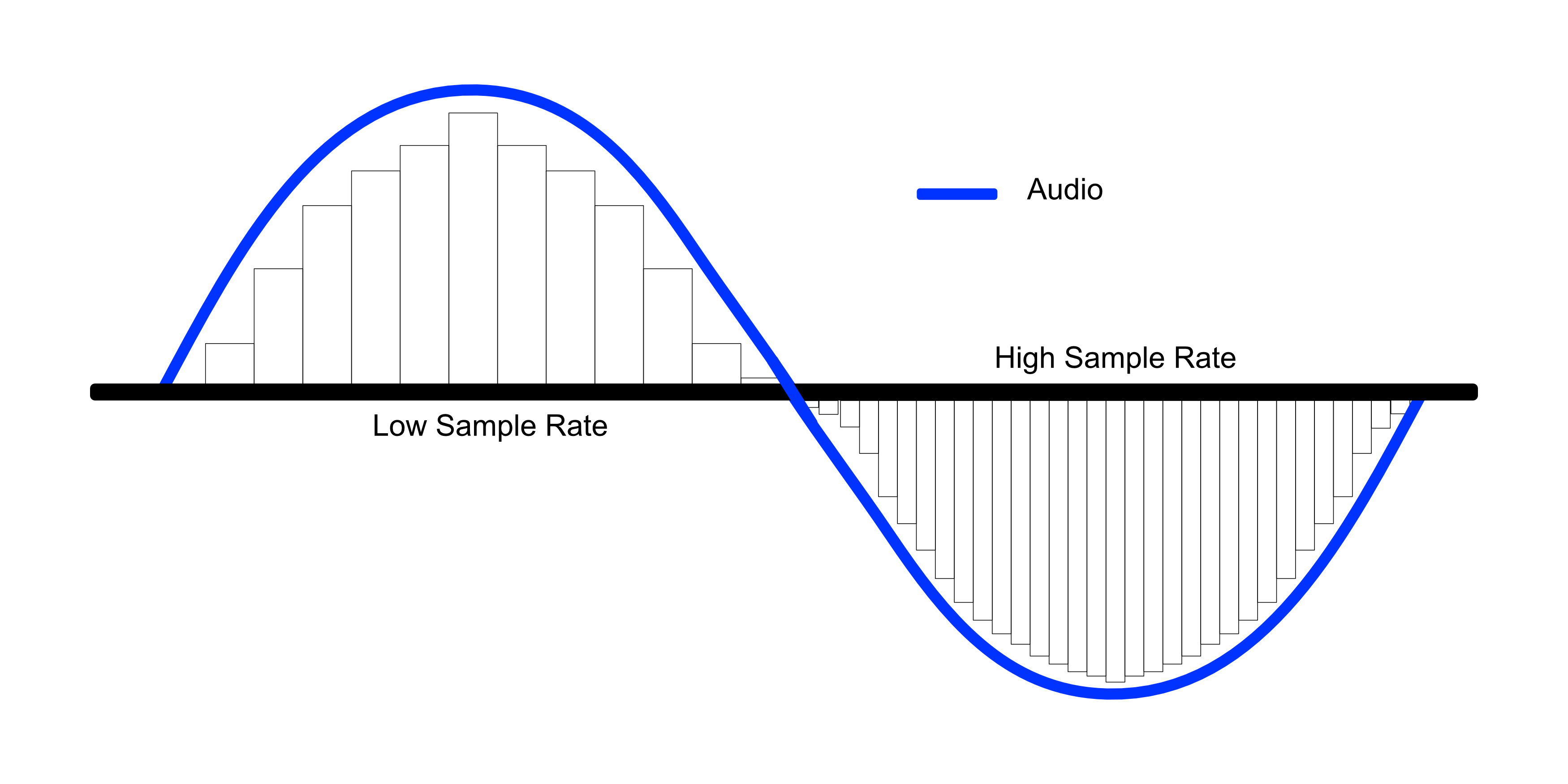
Image result for Sample rate

An open standard is a publicly released specification or set of specifications used in the design of a product, process, or protocol. Think of them as rules that companies voluntarily choose to follow in order to make their products compatible with equipment or software made by others.

There are different types of cameras. A Sxs- sony introduced the XDCAM in 2003, a line of high-end camera using Professional Disc, and optical recording medium like Blu-ray disc, capable of storing up to 50 GB of data. P2- in 2004 Panasonic introduced p2, a solid-state memory card format for use with its top of the line broadcast cameras. A P2 card is made up of multiple SD cards enclosed in a PCMCia card case. Red digital camera- is used to make movies.  The red camera has a lot of storage, some can store but to 4k in high resolution. AVCHD is a proprietary formatted based on the MPEG-4 specifications.

Image result for different types of video cameras

FWIGSS

  • F-FOCUS
  • W-WHITE BALANCE
  • I-IRIS
  • G-GAIN
  • S-SHUTTER SPREAD
  • S-SOUND


Chapter 10 photography

I knew a lot of what this chapter was talking about from taking a photography class at Meredith. This was just a review of the whole class for the most part. It was very detailed. Photography is the process of fixing an image in time through the action of light. In traditional chemical processing, photographic images are created by exposing a light sensitive emulsion on the surface of film to light in a controlled environment.  Digital photography offer instantaneous results, producing images files that are easily transferable and adaptable, for a wide range of multimedia products. Video camera record moving scenes. They have basic operation including controls, shooting modes, and exposure settings.

Image result for funny gif  camera

The lens is an integrated optical system made up of one or more individual elements of ground glass or modeled plastic.  Wide angle lenses have a relatively short focal length, resulting in the wide angle of view. Telephoto lenses have a long focal length, making a narrow view. Normal lenses have a medium focal length, resulting in an angle of view that falls somewhere between wide angle and telephoto. Novelty lenses have descriptive names like macro or fish eye. Macro is for only a few inches away subject. Fisheye have extremely short focal length. Super telephoto lenses yield the narrowest angle of view. Zoom lenses can be adjusted to any focal length within a set optical range. The iris is the adjustable plastic of metal diaphragm that regulates the amount of light striking the image or senor.

Image result for funny gif  lens

Exposure is important when taking pictures. Digital camera creates a picture by exposing the image sensor to light. Underexposed images have a dark appearance and over exposed have a light appearance. Digital cameras have an exposure meter that is an electronic instrument with a light sensitive cell that’s activated by partially depressing the camera’s shutter speed. The aperture is adjusted by turning the innermost ring on the outside of the lens housing. A serious of f-stop numbers are printed on the outer surface of the ring, telling the aperture what size to be. Shutter speed influences how motion is captured by the image sensor. Use a slower speed when subject motion is minimal, the light level is low, and you want a blur effect.

Related image

White balance is important. Some cameras have a hard time getting the right white balance like when it is snows or a white wall. To fix this put a piece of paper in front of the camera and then start to take images after.

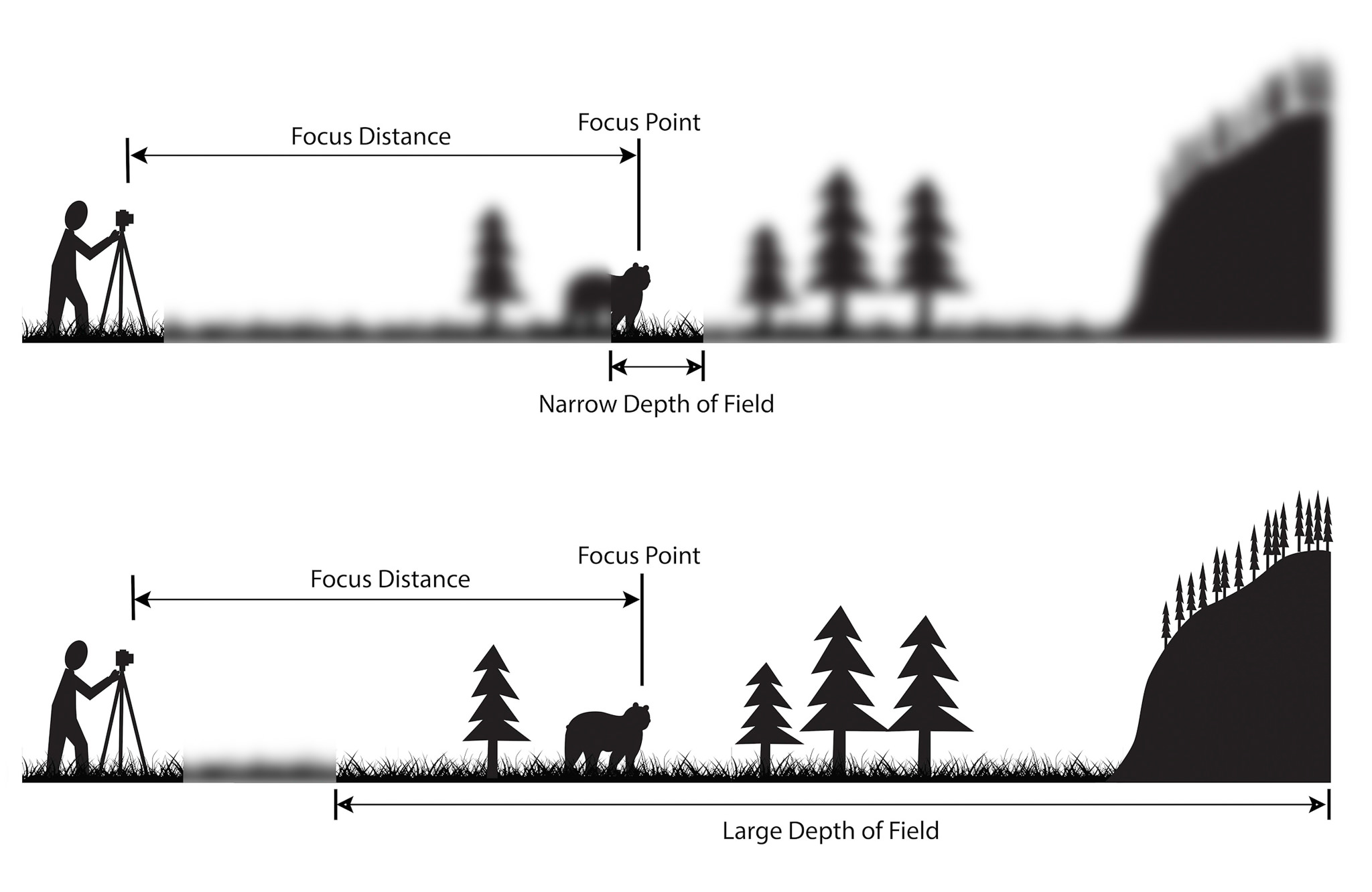
Depth of field is the area of a scene in front and behind the main subject in focus. Great depth of field refers to a photograph where the majority of the scene is sharply defined. Shallow depth of filed is where noticeable portions of the foreground and background are out of focus.

Image result for depth of field

The f-stop numbers really confused me in film photography. I had a hard time getting the right one. Needless to say, I had a lot of over and underexposed images. I took and developed a lot of pictures because I knew some of mine would look very bad. I got a lot of things wrong in this class and seriously rode the struggle bus. The upside I learned a lot from all of bad mistakes because I really couldn’t have done much worse. By the end I almost knew what I was doing.


Chapter 9 Graphics

This chapter was very detailed about graphics and pictures. I learned a lot about how images go from paper onto the screen. There is a lot involved with getting these images onto the screen and to make them look real. A graphic is any type of visual presentation that can be displayed on a physical surface such as a sheet of paper, wall, poster, blackboard, or computer monitor. They are products of a human imagination. They can be created by hand or with computer assisted drawing or design tools.

Images are a two- or three-dimensional representation of a person, animal, object, or scene in the natural world. Digital media is used by cameras. The resolution is the image quality of a raster image and refers to the size and quantity of the pixels the image contains.

Image result for graphic gif funny

Like the tiny bits of tile, a pixel is the smallest deniable element of a raster image. Editors usually measure graphics in pixels, and pixel counts and density determine the physical size and quality of an image. Pixel count is the total number of pixels in a raster matrix. To determine the pixel count, multiply the horizontal and vertical pixel dimensions.

Related image

Raster images have different formats. GIF- offers 256 colors and transparency and is a lossless compression format. Examples would be logos and other images with lines and solid blocks of color. JPEG- offers 16.8 million colors but does not support transparency. It is a glossy compression format and is used for photographs. PNG offers 16.8 million colors and transparency, but you can choose to use fewer colors to save file space. These can be very small and older web browsers do not support this.

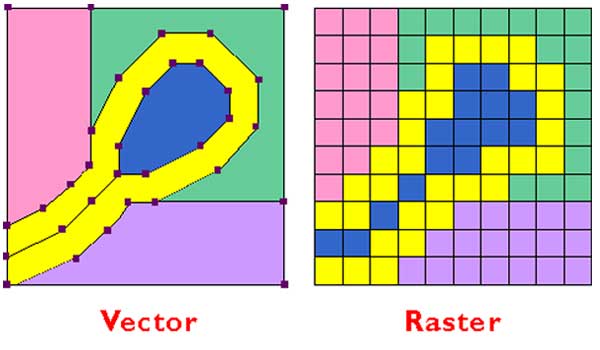
Vector images defines the area of a picture using paths, made up of points, lines, curves, shapes. Each vector forms the outline of a geometric region containing color information. Paths can be mathematically resized; vector graphics can be scaled up or down without losing picture clarity. Clip-art and typefaces are examples of vector graphics.

Image result for raster and vector

Interlaced scanning is something early television standards adopted as a method of rater scanning. This is called interlaced scanning to minimize both bandwidths use and flickering. Fields are one complete scanning pass of either the odd or even scan lines.

Digital television offers many advantages over legacy analog formats. Content created for digital media is more fluid: it can b easily re-purposed and distrusted through secondary channels of communication, making DTV more compatible with computer and internet based systems and services. DTV also, offers less signal interference and uses less bandwidth than equivalent analog television broadcast, which is an advantage because the amount of broadcast is finite.

Image result for Digital television


Chapter 8 Text

Chapter 8 was all about text and how important text is. It can be the make or break point in anything you do. The font and color is extremely important. The book says text is the visual representation of intellectual thought as expressed though human language system. Typography is the art of designing and arranging type. It is important that your text is legible and readable for your audience or viewers. If it is hard to read or understand the text viewers will not continue to read what you are saying no matter how important it is.

Image result for Typography

Bold typefaces increase the width of the stroke and the visual weight of the regular roman letter form. The letter form, serifs and character spacing of boldface type are redesigned to accommodate the increase in stroke thickness so letters have adequate center form. Center from is the white space between and within them.

There are several kinds of typefaces. They are classified into two main groups depending on whether or not they contain serifs, and those groups can be dived in many ways:

  • Serif type faces: there are six main groups Black-letter, Humanist, Old Style, Transitional, Modern, and Slab Serif. These are the industry standards for body that is printed in most newspapers, books, and magazines.
  • San Serif: this means “without”. They are referred to as Gothic or grotesque.  It is used to emboss pages for blind readers. They are mainly used in text headings and titles.
  • Decorative: there add a mood or emotion to the text. They have some personality. They draw attention.
  • Script: these are the easiest letter forms to categorize because they so clearly attempt to emulate the cursive style handwriting. They are used for commercial patterns.
  • Symbol and special characters: the purpose of this is to use symbols that are not found on your key pad.

Image result for different types of fonts

Font styles are also, extremely important. they add emphasis to keywords, headings, or phrases. If you emphasize too many text elements at once the design will appear cluttered.   There are several different font styles like faux, italics, boldface, condescend, all caps, small caps, underline and strike through. They mean and look exactly what they say. Your font size is important not to have it too big or small. It really depends on what you are doing. Normally you want your title or heading to be in a larger font that they body. Also, color is key, you need to make sure they color of font works with the background. You also, need to make sure it can be clearly read and the color is appropriate for you trying to say.

A few tips:

  1. Less is more, this means sometimes less words make more of statement. People are lazy and don’t want to read but so much when what could be said in three sentences is typed out as ten.
  2. Make sure your typeface can convey attitude, emotion and personality.
  3. Make sure your spacing is centered and correct.
  4. Make sure your colors are appropriate and easily read.

Related image


Ch 7 Web Design

I enjoyed this chapter and learned a lot of facts I had no idea about on the Web. The web is the world wide web (WWW), and the internet are not the same thing. I had no idea that they were not the same thing. The web is only part of the internet, we use the web browser. The internet is the global network of networks though which computer communicate.

Image result for gif internet

Demystifying codes are extremely important. Web pages are built using HTML, the newest version is HTML5. HTML has limitation and if you don’t understand the basics of how this works you will never ever understand it. sometimes the codes are hard to understand. A good web developer uses HTML, to label pieces of a document according to their functions and uses CSS to control how those pieces look and behave. This is like structure of everything it sets it up and organizes it. You can from then, edit your graphics and tags. There are many building blocks, list, tables, and more that are short cut keys to help you do this faster.

Image result for gif HTML

Browsers can be a pain because what looks good on one browser my not look as good on another one because it may not interrupt the HTML the right way or the way you intended. Graphical browsers rely on plug ins to show non-HTML based material such as video, Flash Acrobat and Microsoft. Plug ins, run inside of your computer, just like the name “plug in”.

You can create and manage hyperlinks within the website. A link works by using an anchor element with a hypertext reference attribute. An anchor is a piece of a code that tells the browser that the element is a link of some sort and the hypertext reference attribute tells it where to jump to, whether that’s on the same page, another file in the site or another site altogether. You can use a relative URL to link files your website. A relative URL is that name of the file and cues to show where it is in your file structure relative to the current page. You can change the folder structure; some web design applications will give you the option to automatically rename your URLS.

Backgrounds and text colors are extremely important on a web design. When working with a client make sure your color scheme is right for the themes.  To achieve subtle variations, use hexadecimal codes for other colors. You can use color names for basic colors like blue and yellow. Font and type and style are important to viewers. Keep your lines of text short and avoid using all capital letters; they make text hard to read.

Image result for gif bad website design


Ch 6 User interface design

This chapter was interesting from what I could understand of it. It was very high tech and went into a lot of detail. It was about interface design. A user interface is any system that supports human-machine interaction or human- computer interaction. This chapter cover all what humans can do through computers. An interface has both hardware and software components and exists in the forms of both input and output. The input lets users control the system and output enables the system to show the results of the user control. A computer is an example of something that is an interface design. Graphical user interface usually include elements of windows, icons, menus, button, and strolling bars.

Image result for funny meme interface design

There are touch interfaces and voice interfaces. Their name is pretty self-explanatory.  Iphone is an example of touch and siri is an example of voice. There are several UI components and features. Some being navigation, menus, dropdown menus, horizontal dropdown menus, according, and tabs.

You can also, manage the hierarchy of each thing, like your home button on your iphone is the most important key. Hints why it is at the bottom so it is easy to access. Breadcrumbs, also help users from getting lost in the interface. Breadcrumbs are usually for complicated interfaces with hierarchically arranged layers. You also, can organize your content, the content includes text, images, video/audio downloads, as well as other types of data. An example would be a thumbnail which is a reduced size version of a larger image. Carousels organize items on a horizontal line.  Finally, archives help organize a lot of data.

Image result for funny hansel and gretel breadcrumbs

Forms are just what they say they are, you fill out forms all of time. An example would be when you log into your computer that screen that has your password is a form.  They cab have check boxes, radio buttons, or drop down lines. Usability is key, because you want everything to be well organized and easy to understand. Usability is a measure of people’s experience with a user interface. The more tech savvy you are the complex you want everything to be or if you’re like me you want to be on a third-grade level.

Related image

Making interfaces accessible is a major key if not the most important. accessibility is a fundamental principal of user interface design. Accessibility features should address all kinds of disabilities that may affect people’s use of interfaces, including visual, auditory, physical and cognitive problems.

Ch. 5 Page Layout

This chapter was interesting, it was all about page layout. I had no idea about some of the topics in the chapter. I defiantly learned a lot from this chapter. Page layout is a very important concept and extremely important. page layout is the area of graphic design that refers the visual arrangement of text and images on a page. You can use programs like QuarkXPress and Adobe InDesgin for professional software. The F-layout is one of the most common page layouts on the web. Just what the name says, the reader’s gaze is directed through the page in a pattern that looks like a F. Z layout is another and it is exactly what the name says the reader reads the page like the letter Z.

Image result for gif page layout

Headings are extremely important in the layout of a page. This is suppose to draw your viewer to read the whole page. This alignment is extremely important.  You can have more than one header but the one on the top of the page is normally the main one that brings the attention to your page. The titles not as important are subtitles like on power points.

Related image

Grid systems are important in page layout. You can a single column grid which is just one grid just like the name says. You can also, have multicolumn grid, which breaks up the page with more lines.  A table is a rectangular grid consisting of editable regions called cells. This is similar to a typographic grid system, cells are formed by the intersection of columns and rows.

Image result for gif grid

Page templates can help everyone especially beginners at designing a web page.  Page templates are extremely helpful for anyone because they can design a beautiful add or page and all you have to do is add in your pictures and text into the template. There are thousands of templates out there to help you.  There are fixed layouts like for a printed book, newspaper, magazine that has physical dimensions that are the correct size. There are also, fluid layouts which fixes pictures from a tablet or iphone.


ch. 4

This chapter was interesting but somethings where common sense or something I had learned in photography. It was a lot of terms like lines, contrast, texture, pattern, and color. There were some interesting facts I had no idea about and other terms:

Visual communication is an area of study that investigates the transmission of ideas and information through visual forms and symbols. Each person sees things differently.

Related image

Form is the manner in which content is designed, package and delivered for consumption. Ex. A person’s body, looking at jewelry, clothes, and accessories used to accentuate physical appearance.  Content and form are complementary components of a visual design.

Image result for gif checking out women

Aesthetics are our personal observations of different things. Like some people love one color while others hate that color. For professional designers the filed of applied aesthetics addresses the need for industry- specific rules and guidelines used in trade crafts such as cinematography, graphic design, television, or website design.

The element of design is the strategic arrangement of visual elements within a two-dimensional space to form a unified and holistic impression. This is like the building blocks of visual content, meaning its like the walls and floors of a house. Also, if you understand elements of design and their influence this can help a person become a better visual communicator which may help you in life.

People see in two dimensions normally and form adds the dimensions of depth to shape. Form is also, the three dimensional and connects us to more fully to the way we see objects in the natural world.  Shape is a two-dimensional element formed by the enclosure of dots and lines.

The principles of design are extremely important. The elements of design are the ingredients used in making visual art. This means the principles of design is the recipe for combining elements within a visual space.

Image result for gif cooking

Unity is important in videos because if things are not together its harder for our brains to connect the dots, hints the viewer will be bored and not watch your movie or video. The principal of emphasis suggests that a good design must have a primary focal point or center of interest. And example of this is like a headline in a newspaper.

Finally, balance is key it is the visual weight of objects is equally dispersed within the frame. Compositional balance can be achieved using either a symmetrical or asymmetrical approach.

Image result for gif balance funny


Ch. 3 project planning and evaluation

Creativity- involves the production of novel, useful products

Audience:

  • information source- sender
  • message-content
  • transmitter- encode message
  • channel- transmit message
  • receiver- decode message
  • destination- message recipient
  • noise and feedback

Image result for audicance funny gif

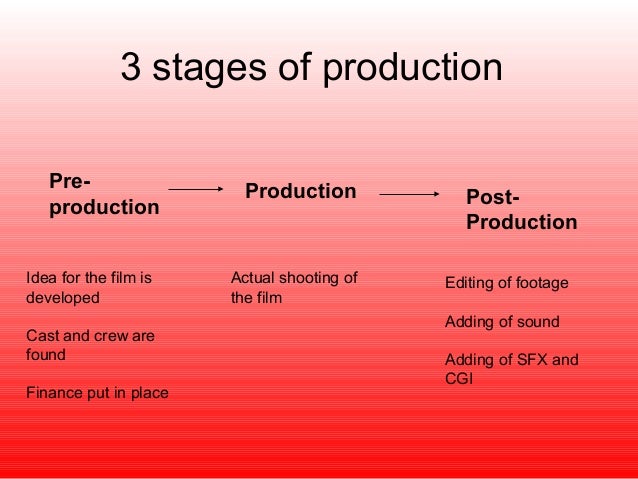
The Three P’s

  1. pre-production
  2. production
  3. postproduction

Image result for the three p's 1.	preproduction 2.	production 3.	postproduction

pre-production– planning and preparation phase of a project.

  1. Problem identification
  2. Idea generation
  3. Concept development writing
  4. Budgeting, scheduling, and project planning

Multimedia production normally involves a producer and client. The message you are going to send has a target audience. In the entertainment and news industries, the title and role of production can vary depending on the type of organization he works for and its management style and structure.

  1. Pre-visualization- ability to anticipate a finished image before making the exposure
  2. Treatment- short narrative description of a project. This is like a short summary.
  3. Storyboard- combines words and pictures together to communicate an idea
  4. Script- written narrative framework for organizing the visual and audio portions of a multimedia presentation

Related image

Production- acquisition phase of a project when all physical media is shot or recorded either on location or in a studio

  • Director- is in charge of all the creative aspects of a production and often has final word
  • Director of photography- means just what it says: is in charge of camera and light crew
  • Camera operator- surprise, this person operates and runs camera
  • Focus puller- first assistant camera, responsible for setting focus and keeping it in shot
  • Production sound mixer- just what title says, responsible for recording all sound performed on location
  • Gaffer or light director- another surprise, chief electrician on a set and responsible for executing light
  • Grip- mechanical rigging of structural supports for lights, set up, and moving equipment
  • Script supervisor- keeps track of each shot, takes notes, and pays close attention to every thing
  • Production coordinator/manager- jack of all trades, hiring crew, ordering food (extremely important job), reserving equipment, clothes, hair, etc.
  • Production assistant- does everything manager says

Image result for production gif

Post production- the assembly phase of a project, where the magic happens

Rough cut- first complete edited version of program

Revisions happen to improve video or program

User-centered design- product of human computer interaction. Main goal- make user interaction as easy as possible

Image result for Post production

Putting principals into design

  1. Analysis
  2. Design
  3. Implementation
  4. Development

Chapter 2- Computers

This chapter is all about computers and how they have changed over time. This chapter would be helpful to someone who did not grow up with a cell phone in their hand, they can learn how computers works. Also, how they have changed over time. It is the digital revolution because people are no longer using books they are downloading them to their computers to read.

Image result for computer changing

The main bullet points in the first part of the chapter are:

Computer hardware- the physical computers and electronic devices used to carry out a specific design and production activities

Computer software- computers program or set of programs that is designed to perform a specific set of task or functions that need to be loaded into the computer’s memory

Operating system software- it is loaded on computer and it runs applications on computer

Application software-installed on computer that’s designed to perform a specific type of work or task

Computers have to be controlled by humans they control the computer by using the mouse and keyboard. The mouse is the cursers that allows you to control what to click. The keyboard is used for typing.

Related image

There are several ways to safe files on a computer. Some of these are:

Fixed storage disk- non removable chip or storage drive

Removable storage- can easily move data from one computer with another using this

Optical disk storage- laser beam to read and encode data onto the reflections inner surface of a hard plastic disk. Examples compact disk, DVD, and Blue-ray disk

Flash memory- solid state chip technology used in a variety of digital appliances. Example incluse magnetic storage, Network- attached storage, cloud content and management systems, cloud storage, file sharing, collaboration, and synchronization

You can connect drives and devices to your computer like hard drives and printers you use the USB ports.

Image result for funny flash drive